Top-Rated CRMs with Mobile Apps: Empowering Businesses On-the-Go
In today’s fast-paced business environment, staying connected and responsive is crucial for success. Customer Relationship Management (CRM) systems have become indispensable tools for businesses of all sizes, helping them manage customer interactions, streamline sales processes, and improve overall customer satisfaction. As mobile technology continues to evolve, the demand for CRM solutions with robust mobile apps has skyrocketed.
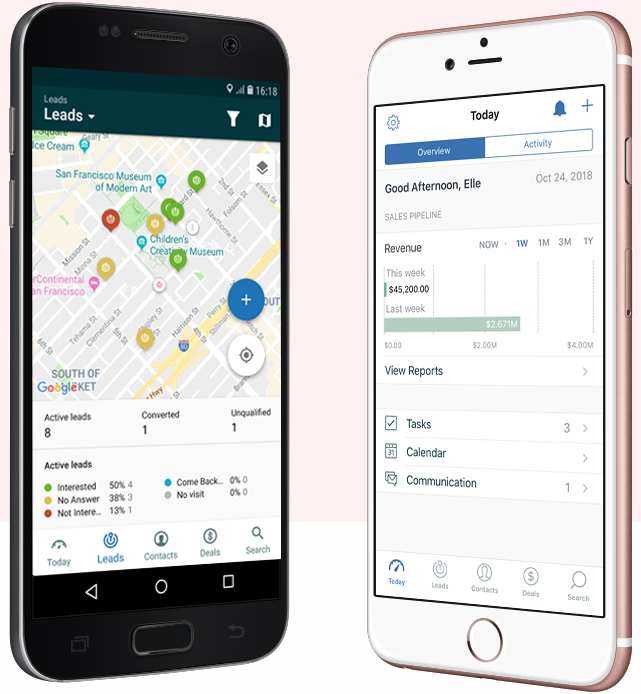
A mobile CRM app allows sales representatives, marketers, and customer service agents to access critical customer data, manage tasks, and collaborate with colleagues from anywhere, at any time. This level of flexibility and accessibility can lead to increased productivity, improved decision-making, and enhanced customer experiences.
In this article, we’ll explore some of the top-rated CRM systems with mobile apps, highlighting their key features, benefits, and pricing structures. Whether you’re a small business owner or a sales manager at a large corporation, this guide will help you find the perfect mobile CRM solution to empower your team and drive business growth.
Key Features to Look for in a Mobile CRM App
Before diving into the top CRM systems, let’s first outline the key features that make a mobile CRM app truly effective:
-
Contact Management:
- Access and update customer contact information, including names, email addresses, phone numbers, and social media profiles.
- View customer interaction history, including emails, phone calls, meetings, and notes.
- Segment contacts based on various criteria, such as industry, location, or purchase history.
-
Lead Management:
- Capture and track leads from various sources, such as website forms, social media, and trade shows.
- Assign leads to sales representatives and track their progress through the sales pipeline.
- Qualify leads based on predefined criteria and prioritize follow-up efforts.
-
Sales Management:
- Manage sales opportunities, including deal size, probability, and close date.
- Track sales activities, such as calls, emails, and meetings.
- Generate quotes and proposals on the go.
- Forecast sales revenue and track performance against targets.
-
Task Management:
- Create and assign tasks to team members.
- Set deadlines and reminders for tasks.
- Track task progress and completion status.
-
Calendar Integration:
- Sync with your existing calendar to schedule appointments and meetings.
- View your daily, weekly, or monthly schedule.
- Receive reminders for upcoming events.
-
Email Integration:
- Send and receive emails directly from the CRM app.
- Track email interactions with customers and prospects.
- Automate email marketing campaigns.
-
Reporting and Analytics:
- Access real-time data and insights on sales performance, customer behavior, and marketing effectiveness.
- Generate custom reports and dashboards to track key metrics.
- Identify trends and opportunities to improve business outcomes.
-
Offline Access:
- Access and update data even when you’re not connected to the internet.
- Sync changes when you regain connectivity.
-
Customization:
- Customize the app to fit your specific business needs.
- Add custom fields, workflows, and reports.
- Integrate with other business applications.
-
Security:
- Protect sensitive customer data with robust security measures.
- Ensure compliance with data privacy regulations.
- Implement user access controls and permissions.
Top-Rated CRM Systems with Mobile Apps
Now that we’ve covered the key features to look for, let’s take a look at some of the top-rated CRM systems with mobile apps:
-
Salesforce Sales Cloud:
- Overview: Salesforce Sales Cloud is the leading CRM platform for businesses of all sizes. It offers a comprehensive suite of features for sales, marketing, and customer service.
- Mobile App: The Salesforce mobile app provides access to all of the key features of Sales Cloud, including contact management, lead management, sales opportunity management, and reporting.
- Key Features:
- AI-powered insights and recommendations
- Customizable dashboards and reports
- Workflow automation
- Integration with other Salesforce products and third-party applications
- Pricing: Salesforce Sales Cloud offers a variety of pricing plans, starting at $25 per user per month.
-
HubSpot CRM:
- Overview: HubSpot CRM is a free CRM platform that offers a range of features for sales, marketing, and customer service.
- Mobile App: The HubSpot mobile app provides access to all of the key features of HubSpot CRM, including contact management, lead management, sales pipeline management, and task management.
- Key Features:
- Free to use
- Easy to set up and use
- Integration with other HubSpot products
- Powerful marketing automation features
- Pricing: HubSpot CRM is free to use. HubSpot also offers a variety of paid add-ons and upgrades.
-
Zoho CRM:
- Overview: Zoho CRM is a cloud-based CRM platform that offers a wide range of features for sales, marketing, and customer service.
- Mobile App: The Zoho CRM mobile app provides access to all of the key features of Zoho CRM, including contact management, lead management, sales opportunity management, and reporting.
- Key Features:
- Customizable workflows and automation
- Integration with other Zoho products
- Advanced reporting and analytics
- AI-powered sales assistant
- Pricing: Zoho CRM offers a variety of pricing plans, starting at $12 per user per month.
-
Microsoft Dynamics 365 Sales:
- Overview: Microsoft Dynamics 365 Sales is a cloud-based CRM platform that offers a range of features for sales, marketing, and customer service.
- Mobile App: The Dynamics 365 Sales mobile app provides access to all of the key features of Dynamics 365 Sales, including contact management, lead management, sales opportunity management, and reporting.
- Key Features:
- Integration with other Microsoft products, such as Office 365 and Power BI
- AI-powered insights and recommendations
- Customizable workflows and automation
- Advanced reporting and analytics
- Pricing: Dynamics 365 Sales offers a variety of pricing plans, starting at $65 per user per month.
-
Pipedrive:
- Overview: Pipedrive is a sales-focused CRM platform that helps businesses manage their sales pipeline and close more deals.
- Mobile App: The Pipedrive mobile app provides access to all of the key features of Pipedrive, including contact management, deal management, activity tracking, and reporting.
- Key Features:
- Visual sales pipeline
- Easy to use interface
- Automation of repetitive tasks
- Integration with other sales tools
- Pricing: Pipedrive offers a variety of pricing plans, starting at $12.50 per user per month.
Choosing the Right Mobile CRM for Your Business
When choosing a mobile CRM for your business, it’s important to consider your specific needs and requirements. Here are some factors to keep in mind:
- Business Size: Smaller businesses may be able to get by with a free or low-cost CRM, while larger businesses may need a more comprehensive and feature-rich solution.
- Industry: Some CRMs are specifically designed for certain industries, such as healthcare, finance, or retail.
- Budget: CRM pricing can vary widely, so it’s important to set a budget and find a CRM that fits your needs.
- Features: Make a list of the features that are most important to you and choose a CRM that offers those features.
- Ease of Use: Choose a CRM that is easy to set up and use, so that your team can start using it right away.
- Integration: Make sure that the CRM integrates with the other business applications that you use, such as your email marketing platform, accounting software, and e-commerce platform.
- Mobile App: Ensure that the CRM has a robust mobile app that provides access to all of the key features that your team needs while on the go.
- Customer Support: Choose a CRM that offers excellent customer support, so that you can get help when you need it.
Conclusion
A mobile CRM app is an essential tool for businesses looking to improve their customer relationships, streamline their sales processes, and increase their overall productivity. By choosing the right mobile CRM for your business, you can empower your team to stay connected, informed, and productive, no matter where they are. Consider your specific needs, budget, and requirements when making your decision, and don’t hesitate to try out free trials of different CRM systems to find the perfect fit for your business.