Software Development Lifecycle (SDLC) Tools: A Comprehensive Guide
The Software Development Lifecycle (SDLC) is a structured, phased approach to building software applications. It encompasses all activities involved in planning, creating, testing, and deploying a software product. To manage the complexities of modern software development, teams rely on a variety of specialized tools that streamline processes, improve collaboration, and enhance the quality of the final product.
Why SDLC Tools are Essential
- Improved Collaboration: Modern software projects involve teams of developers, designers, testers, and project managers, often spread across different locations. SDLC tools provide a centralized platform for communication, task management, and knowledge sharing, ensuring that everyone is on the same page.
- Enhanced Productivity: By automating repetitive tasks, providing clear workflows, and offering real-time insights into project progress, SDLC tools free up developers to focus on core coding and problem-solving.
- Better Quality: SDLC tools help to enforce coding standards, automate testing, and track defects, leading to more reliable and robust software applications.
- Reduced Costs: By optimizing resource allocation, identifying potential problems early, and minimizing rework, SDLC tools can significantly reduce the overall cost of software development.
- Increased Transparency: SDLC tools provide stakeholders with visibility into the project’s progress, milestones, and potential risks, enabling them to make informed decisions and provide timely feedback.
- Streamlined Documentation: SDLC tools often include features for generating documentation automatically, ensuring that all aspects of the software development process are properly documented.
- Effective Project Management: SDLC tools offer features for project planning, task assignment, progress tracking, and risk management, enabling project managers to keep projects on track and within budget.
Key Stages of the SDLC and Associated Tools
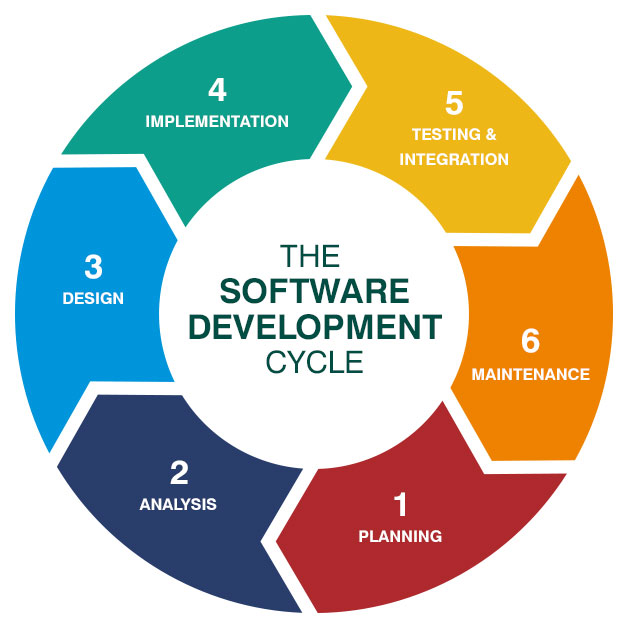
The SDLC typically consists of the following stages:
-
Planning: This initial phase involves defining the project’s objectives, scope, and requirements. Tools used in this phase include:
- Requirements Management Tools: These tools help to gather, document, and manage software requirements. Examples: Jira, Azure DevOps, Jama Software.
- Project Management Tools: These tools aid in creating project plans, assigning tasks, setting deadlines, and tracking progress. Examples: Asana, Trello, Monday.com.
-
Design: In this phase, the software’s architecture, user interface, and data structures are designed. Tools used in this phase include:
- UML Modeling Tools: These tools allow developers to create visual representations of the software’s structure and behavior using Unified Modeling Language (UML). Examples: Lucidchart, Visual Paradigm, Enterprise Architect.
- UI/UX Design Tools: These tools enable designers to create wireframes, mockups, and prototypes of the user interface. Examples: Figma, Adobe XD, Sketch.
-
Implementation (Coding): This is the phase where developers write the actual code for the software. Tools used in this phase include:
- Integrated Development Environments (IDEs): IDEs provide a comprehensive environment for coding, debugging, and testing software. Examples: Visual Studio, Eclipse, IntelliJ IDEA.
- Version Control Systems: These tools allow developers to track changes to the codebase, collaborate effectively, and revert to previous versions if necessary. Examples: Git (GitHub, GitLab, Bitbucket).
- Code Review Tools: These tools facilitate code reviews, ensuring that code meets quality standards and best practices. Examples: Crucible, Collaborator, Review Board.
-
Testing: In this phase, the software is tested to ensure that it meets the specified requirements and is free of defects. Tools used in this phase include:
- Test Management Tools: These tools help to plan, execute, and track software testing activities. Examples: TestRail, Zephyr, Xray.
- Automated Testing Tools: These tools automate the execution of tests, reducing the time and effort required for testing. Examples: Selenium, JUnit, TestNG.
- Bug Tracking Tools: These tools allow testers to report and track software defects. Examples: Jira, Bugzilla, Mantis.
-
Deployment: This phase involves deploying the software to the production environment. Tools used in this phase include:
- Continuous Integration/Continuous Deployment (CI/CD) Tools: These tools automate the process of building, testing, and deploying software, ensuring that changes are released quickly and reliably. Examples: Jenkins, GitLab CI, CircleCI, Azure DevOps.
- Configuration Management Tools: These tools help to automate the configuration of servers and applications, ensuring that they are consistent and reliable. Examples: Ansible, Chef, Puppet.
-
Maintenance: This final phase involves providing ongoing support for the software, including bug fixes, enhancements, and updates. Tools used in this phase include:
- Monitoring Tools: These tools monitor the performance and availability of the software, alerting administrators to potential problems. Examples: New Relic, Datadog, Prometheus.
- Help Desk Tools: These tools provide a centralized platform for managing customer support requests. Examples: Zendesk, Freshdesk, Jira Service Management.
Examples of Popular SDLC Tools
Here are some of the most popular SDLC tools used by software development teams today:
- Jira: A versatile issue tracking and project management tool that is widely used for agile development.
- Azure DevOps: A comprehensive suite of tools for software development, including version control, CI/CD, and test management.
- Git/GitHub/GitLab/Bitbucket: Essential version control systems that enable developers to collaborate effectively on code.
- Jenkins: A popular open-source CI/CD tool that automates the process of building, testing, and deploying software.
- Selenium: A widely used automated testing tool for web applications.
- TestRail: A comprehensive test management tool that helps to plan, execute, and track software testing activities.
- Figma: A collaborative UI/UX design tool that allows designers to create wireframes, mockups, and prototypes.
- Asana/Trello/Monday.com: Popular project management tools that help teams to organize tasks, track progress, and collaborate effectively.
- Visual Studio/Eclipse/IntelliJ IDEA: Powerful IDEs that provide a comprehensive environment for coding, debugging, and testing software.
Selecting the Right SDLC Tools
Choosing the right SDLC tools is crucial for the success of any software development project. When selecting tools, consider the following factors:
- Project Size and Complexity: The tools should be appropriate for the size and complexity of the project.
- Team Size and Skillset: The tools should be easy to use and compatible with the team’s skillset.
- Budget: The cost of the tools should be within the project’s budget.
- Integration with Existing Tools: The tools should integrate seamlessly with the team’s existing tools and workflows.
- Scalability: The tools should be able to scale as the project grows.
- Security: The tools should be secure and protect sensitive data.
Conclusion
SDLC tools are an essential part of modern software development. By streamlining processes, improving collaboration, and enhancing the quality of the final product, these tools can significantly improve the efficiency and effectiveness of software development teams. When selecting SDLC tools, it is important to consider the project’s specific needs and choose tools that are appropriate for the team’s skillset, budget, and existing workflows. As software development continues to evolve, SDLC tools will play an increasingly important role in ensuring that software is delivered on time, within budget, and to the highest quality standards.