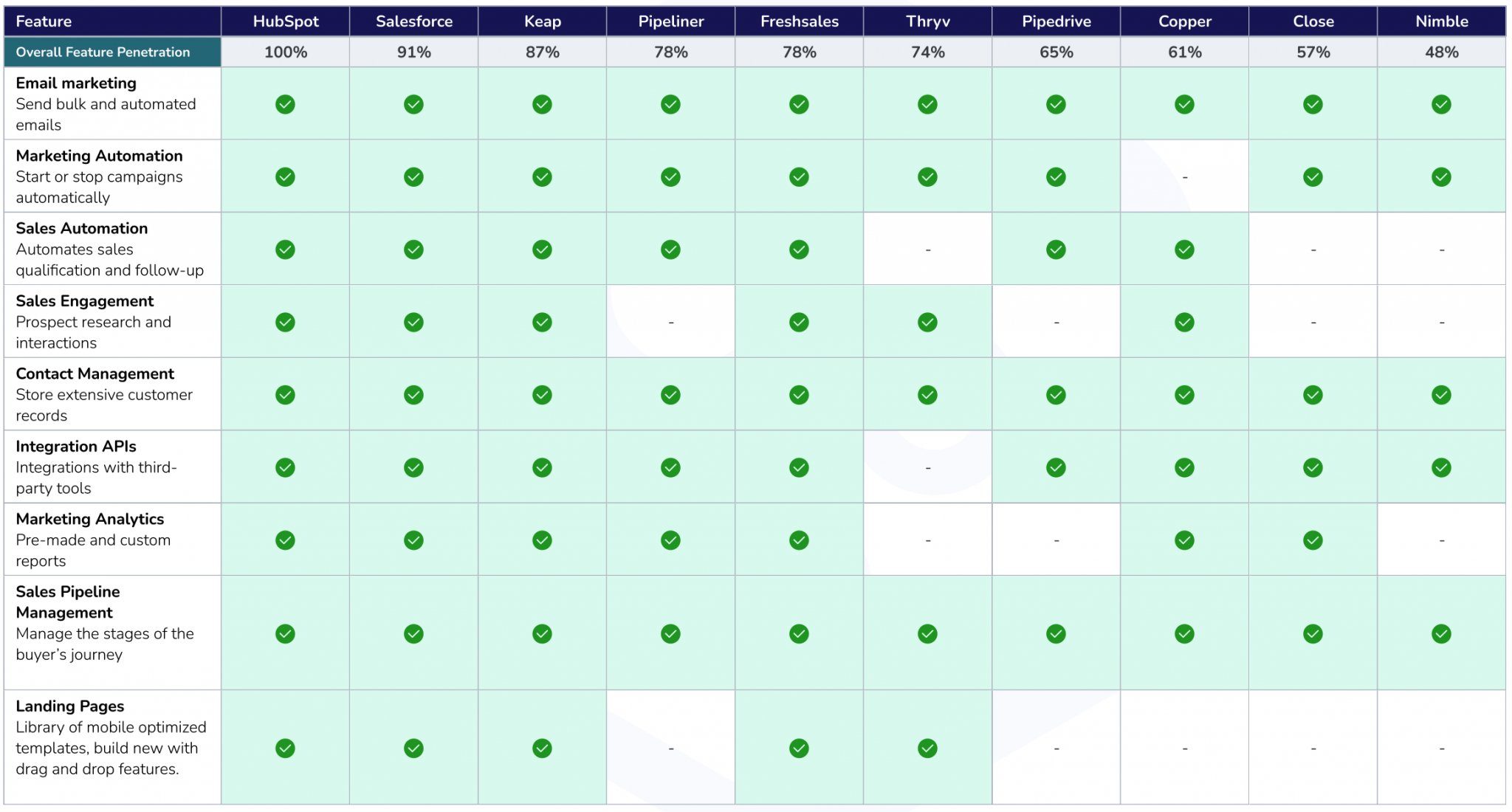
CRM Software Comparison: Choosing the Right Solution for Your Business
In today’s competitive landscape, Customer Relationship Management (CRM) software is no longer a luxury but a necessity for businesses of all sizes. A well-chosen CRM system can streamline operations, improve customer engagement, and ultimately drive revenue growth. However, with a plethora of options available, selecting the right CRM solution can be a daunting task. This article provides a comprehensive comparison of popular CRM software, highlighting their features, pricing, pros, cons, and ideal use cases, to help you make an informed decision.
Why is CRM Software Important?
Before diving into specific CRM solutions, it’s crucial to understand the core benefits of implementing a CRM system:
- Centralized Customer Data: CRM software consolidates customer information from various sources (e.g., website, email, social media, sales interactions) into a single, unified view.
- Improved Customer Relationships: By understanding customer needs and preferences, businesses can personalize interactions, build stronger relationships, and increase customer loyalty.
- Enhanced Sales Productivity: CRM tools automate sales processes, track leads, manage opportunities, and provide insights into sales performance, enabling sales teams to close more deals.
- Streamlined Marketing Campaigns: CRM systems facilitate targeted marketing campaigns, track campaign effectiveness, and optimize marketing efforts for better ROI.
- Better Customer Service: CRM software empowers customer service teams to resolve issues quickly and efficiently by providing access to customer history, interaction logs, and knowledge base articles.
- Data-Driven Decision Making: CRM analytics provide valuable insights into customer behavior, sales trends, and marketing performance, enabling businesses to make informed decisions based on data.
Key Features to Consider
When evaluating CRM software, consider the following key features:
- Contact Management: The ability to store, organize, and manage customer and prospect information.
- Sales Force Automation: Automating sales processes such as lead management, opportunity tracking, and sales forecasting.
- Marketing Automation: Automating marketing tasks such as email marketing, social media management, and lead nurturing.
- Customer Service: Tools for managing customer inquiries, resolving issues, and providing support.
- Analytics and Reporting: Generating reports and dashboards to track key performance indicators (KPIs) and gain insights into business performance.
- Integration: The ability to integrate with other business systems such as accounting software, email platforms, and e-commerce platforms.
- Mobile Access: Accessing CRM data and functionality from mobile devices.
- Customization: The ability to customize the CRM system to meet specific business needs.
- User Interface: An intuitive and user-friendly interface that is easy to navigate and use.
- Security: Robust security measures to protect customer data.
CRM Software Comparison
Let’s delve into a comparison of some popular CRM software solutions:
1. Salesforce Sales Cloud
- Overview: Salesforce Sales Cloud is the market leader in CRM software, known for its comprehensive features, scalability, and robust ecosystem of apps and integrations.
- Key Features: Contact management, sales force automation, lead management, opportunity tracking, sales forecasting, marketing automation, customer service, analytics and reporting, mobile access, and customization.
- Pricing: Offers multiple editions with varying features and pricing, starting from around $25 per user per month.
- Pros: Highly customizable, scalable, comprehensive feature set, strong integration capabilities, large user community, and excellent customer support.
- Cons: Can be expensive for small businesses, complex to set up and configure, and requires significant training.
- Ideal Use Case: Large enterprises and mid-sized businesses with complex sales processes and a need for a highly customizable and scalable CRM solution.
2. HubSpot CRM
- Overview: HubSpot CRM is a popular choice for small and medium-sized businesses, known for its user-friendly interface, free version, and strong marketing automation capabilities.
- Key Features: Contact management, sales force automation, lead management, email marketing, marketing automation, customer service, analytics and reporting, and integration with HubSpot’s other marketing and sales tools.
- Pricing: Offers a free version with limited features, as well as paid plans with more advanced functionality, starting from around $45 per month.
- Pros: User-friendly interface, free version available, strong marketing automation capabilities, excellent customer support, and seamless integration with HubSpot’s other tools.
- Cons: Limited customization options compared to Salesforce, and the free version has limited features.
- Ideal Use Case: Small and medium-sized businesses looking for a user-friendly CRM with strong marketing automation capabilities and a free option to get started.
3. Zoho CRM
- Overview: Zoho CRM is a cost-effective CRM solution that offers a wide range of features and integrations, making it a popular choice for small and medium-sized businesses.
- Key Features: Contact management, sales force automation, lead management, opportunity tracking, sales forecasting, marketing automation, customer service, analytics and reporting, mobile access, and integration with Zoho’s other business applications.
- Pricing: Offers multiple editions with varying features and pricing, starting from around $14 per user per month.
- Pros: Affordable pricing, comprehensive feature set, strong integration capabilities, mobile access, and excellent customer support.
- Cons: Can be complex to set up and configure, and the user interface is not as modern as some other CRM solutions.
- Ideal Use Case: Small and medium-sized businesses looking for a cost-effective CRM solution with a wide range of features and integrations.
4. Microsoft Dynamics 365 Sales
- Overview: Microsoft Dynamics 365 Sales is a CRM solution that integrates seamlessly with other Microsoft products such as Office 365 and Power BI.
- Key Features: Contact management, sales force automation, lead management, opportunity tracking, sales forecasting, marketing automation, customer service, analytics and reporting, mobile access, and integration with other Microsoft products.
- Pricing: Offers multiple editions with varying features and pricing, starting from around $65 per user per month.
- Pros: Seamless integration with other Microsoft products, strong analytics capabilities, mobile access, and excellent customer support.
- Cons: Can be expensive for small businesses, complex to set up and configure, and requires significant training.
- Ideal Use Case: Businesses that heavily rely on Microsoft products and are looking for a CRM solution that integrates seamlessly with their existing infrastructure.
5. Pipedrive
- Overview: Pipedrive is a sales-focused CRM designed to help sales teams manage their pipelines and close more deals.
- Key Features: Contact management, sales force automation, lead management, opportunity tracking, sales forecasting, email integration, and mobile access.
- Pricing: Offers multiple plans with varying features and pricing, starting from around $12.50 per user per month.
- Pros: User-friendly interface, sales-focused features, affordable pricing, and excellent customer support.
- Cons: Limited marketing automation capabilities compared to other CRM solutions.
- Ideal Use Case: Small and medium-sized businesses that are focused on sales and need a CRM solution to help them manage their pipelines and close more deals.
Choosing the Right CRM for Your Business
Selecting the right CRM software requires careful consideration of your business needs, budget, and technical capabilities. Here are some steps to guide your decision-making process:
- Define Your Requirements: Identify your business goals and the specific features you need from a CRM system.
- Set a Budget: Determine how much you are willing to spend on a CRM solution, considering both upfront costs and ongoing maintenance fees.
- Research and Compare: Research different CRM solutions and compare their features, pricing, pros, and cons.
- Request Demos: Request demos from multiple CRM vendors to see the software in action and get a feel for the user interface.
- Consider Integration: Ensure that the CRM system integrates with your other business systems.
- Read Reviews: Read online reviews and testimonials from other users to get an idea of their experiences with the software.
- Pilot Test: Conduct a pilot test with a small group of users to evaluate the software’s usability and effectiveness.
- Make a Decision: Based on your research, demos, and pilot test, choose the CRM solution that best meets your business needs and budget.
Conclusion
Choosing the right CRM software is a critical decision that can significantly impact your business’s success. By carefully evaluating your needs, researching different solutions, and considering the factors outlined in this article, you can select a CRM system that will help you improve customer relationships, enhance sales productivity, and drive revenue growth. Remember to prioritize user-friendliness, scalability, and integration capabilities to ensure that your CRM investment delivers long-term value.